
How to Activate Cheat of Age of Empires II

AOK-AOE II
If you play AOE / AOE II alone (single player) versus the computer, the cheat will be automatically activated when playing, but if you play more than one person (multiplayer),cheat option must be activated first, but of course must be approved by the other players.

To activate the AOK / AOE 2 cheats both for single player and multiplayer game is the same way, just press enter on your keyboard while playing the game like to chat, then write the corresponding cheat codes created by programmer i.e. "ROBIN HOOD" for adding 1000 Golds, "ROCK ON" for adding 1000 stones, and so forth. After that hit enter again.
See the examples below:

AOK Cheat
This is condition before inserting cheat, Gold = 100

AOE II Cheat
This is condition after inserting cheat "ROBIN HOOD", Gold = 1100 (increase 1000)

AOK II Cheat
This is condition before inserting cheat, there are unique units
AGE of Empires II
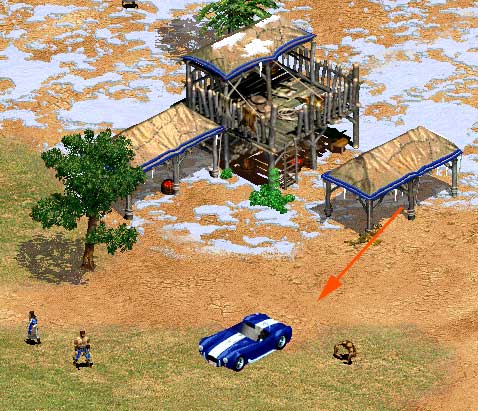
This is condition after inserting cheat "HOW DO YOU TURN THIS ON" 
and "FURIOUS THE MONKEY BOY" now you can see Cobra Car and The Magic Monkey :)

You need another cheats? Please see on page "Cheat of Age of Empires II The Conquerors" You need hotkeys of the game? Please see on page of "Hotkeys for Age of Empires II The Conquerors"

Popular posts from this blog

Hotkeys for Age of Empires II The Conquerors

Game programmer usually keep a special code into program that he created for the hotkeys when playing including in the Game Age of Empires II The Conquerors . Hotkey in a game is a kind of shortcut that is one or more keyboard keys that are combined to shorten an instruction without having to use a mouse so that an instruction can be executed quickly while playing.For example in Age of Empires II (AOK-II or AOE-II) when villager will make a house or other buildings, player must click on the villager, then the mouse is directed to the bottom left corner to select an appropriate menu, and then directed to to the map to place that house or other buildings to be built. This can be alleviated by using a hotkey (B then E) or (V then E). In the AOK-II or AOE-II, there are many default hotkeys, but the player can set any hotkey to suit the wishes of the option Hotkeys. Hotkeys settings can be done before the game starts or while it is playing (at the top right corner of menu). If ther...

Best Tablet Games for Android – Big Screens, Bigger Fun!

As tablets continue to rise in popularity, more gamers are turning to these larger Android devices for immersive and comfortable gameplay. Whether you're lounging at home, on a long flight, or relaxing during your free time, Android tablets offer a perfect balance between mobility and screen size. But not every game is optimized for tablets—some look stretched, awkward, or even laggy. That’s why we’ve handpicked the best tablet games for Android in 2025 that not only look great on big screens, but also provide engaging, long-lasting fun. From action-packed adventures to relaxing puzzles, these games are tailor-made for tablets and free (or affordable) to play. Why Tablet Gaming Is Better Than Ever Before diving into the list, here’s why more gamers are choosing tablets: Larger screens = better control, wider field of view Longer battery life = extended gaming sessions Multitasking support = play and browse simultaneously Higher resolution = smoother and sharper graphics Perfect fo...